


Why an Employee Clock in System is a Game-Changer for Small Businesses

If you run a small business, you probably already know how frustrating it can be to track who arrives, when they leave, and how long they actually work. That’s exactly where an employee clock in system comes in. Instead of relying on pen-and-paper sheets or guesswork, a modern clocking system gives you accurate, real-time data about your team’s working hours – and it can make payroll, compliance, and daily management far easier.

Computime UK specialises in exactly this kind of solution, offering flexible clocking systems designed for small and growing businesses. From biometric fingerprint and facial recognition to simple card/fob options and mobile app technology, their systems help you move from “trust me, I was here” to “here’s the proof.”
What Is an Employee Clock In System?
An system (often called a time clock or staff clocking system) is any hardware or software that lets employees record when they start and finish work. Traditional systems used punch cards or mechanical clocks; modern systems use:
Biometrics (fingerprint or facial recognition)
RFID swipe cards or fobs
Mobile apps with GPS or network-based location checks
Desktop or web-based interfaces
The data is then sent – often in real time using PUSH technology – to your internal system or cloud platform, where it can be used for payroll, reporting, and compliance.
With Computime’s solutions, you can choose a setup that matches your business size, budget, and security needs. If biometrics feel too complex, their card and fob option is quick, reliable, and easy to use, while still giving you accurate records.
Why Small Businesses Need One
For small businesses, time is money. Every hour spent manually calculating hours, chasing missing signatures, or correcting payroll errors is an hour taken away from growing your company. An clock in system helps in several practical ways:
1. Accurate Payroll, Less Stress
When hours are recorded automatically, payroll becomes much simpler. You’re not guessing how many hours someone worked or trying to piece together torn sheets of paper. Accurate data means:
Employees get paid correctly for the time they actually worked
Overtime is calculated properly
Disputes about hours are reduced
This fairness also improves employee satisfaction, as staff can see that pay is based on transparent, reliable records.
2. Reduced Administrative Workload
Managers and HR teams often spend a lot of time on admin: collecting timesheets, checking them, and feeding data into payroll software. A clocking system automates most of this. With real-time reporting and automatic data transfer, you:
Cut down on manual entry
Reduce the risk of human errors
Free up time for more important tasks
Computime’s systems are designed to integrate seamlessly with major payroll software, so you don’t end up with extra processing steps after implementation
3. Better Compliance and Fraud Prevention
In many regions, businesses must keep accurate records of working hours for legal and compliance reasons. An employee clock in system provides:
Clear evidence of when staff started and finished work
Timestamped records that can be used in case of disputes
Tools to spot unusual patterns, like repeated late arrivals or unexpected overtime
Biometric options (fingerprint or facial recognition) also help prevent “buddy punching” – where one employee clocks in for another – giving you stronger evidence against fraud.
Types of Employee Clock In Systems
Different businesses need different solutions. Here are the main types you might consider:
Biometric Systems
These use fingerprint or facial recognition to identify each employee uniquely. They are:
Very secure
Hard to fake
Ideal for businesses that need strong identity verification
Computime offers biometric fingerprint and facial recognition ID options for organisations that want high security without unnecessary complexity.
Card and Fob (RFID) Systems
If biometrics feel too advanced or invasive, a card/swipe or fob system is a great alternative. Employees simply:
Swipe their card or tap their fob on the terminal
The system records the time automatically
This is quick, reliable, and easy to train staff on, making it ideal for small businesses that want simplicity.
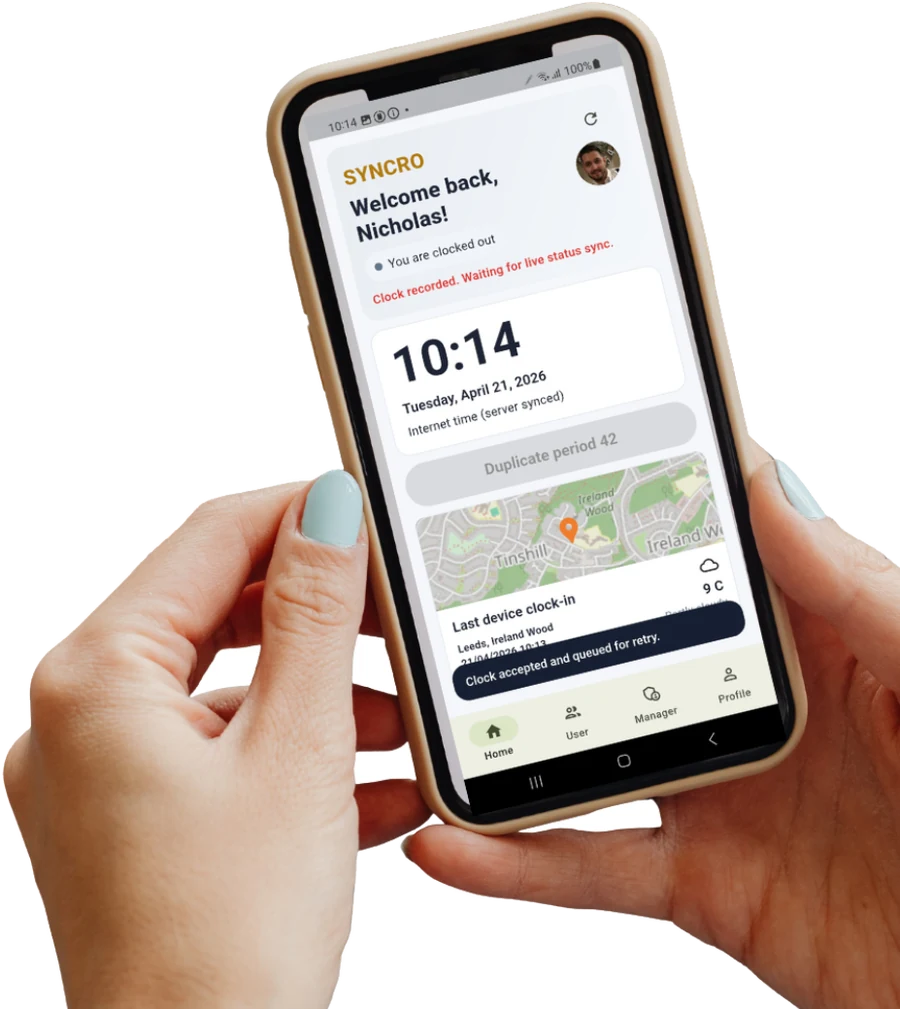
Mobile App and Web-Based Systems
For businesses with remote workers, multiple sites, or flexible schedules, mobile app clocking is very useful. Employees can:\
Clock in/out from their own devices
Use GPS or network checks to confirm location
View their own hours and timesheets
Computime’s mobile app technology supports this kind of flexible working, allowing real-time communication using PUSH technology over local networks, Wi‑Fi, or GPRS.
Choosing the Right System for Your Business

When you’re looking for an employee clock in system, it’s important to match the solution to your specific needs. Consider:
Size of your team: A small team might only need a basic card system; a larger team may benefit from biometrics or mobile apps.
Work patterns: Do staff work at one site, multiple sites, or remotely?
Security needs: Do you need strong identity verification to prevent fraud?
Budget: Some systems are more affordable upfront, while others offer more features.
Computime starts every purchase with a consultation. They help you choose a system based on your operational needs and commercial constraints, so you don’t end up with something that’s too complex or too expensive.
Support and Scalability
A good clocking system isn’t just about the hardware; it’s about the support you get and how well the system grows with you.
Scalable Solutions
As your business grows, your clocking needs will change. You might add more staff, open new sites, or introduce new working patterns. Computime’s systems are designed to be scalable, accommodating your evolving needs as you grow. This means you don’t have to replace the entire system when your business expands – you can simply add terminals, users, or features.
UK-Based Support
Having reliable support is crucial, especially when you’re new to clocking systems. Computime provides UK-based technical support for all customers. During implementation, they allocate a project manager and work with highly qualified installers, ensuring you’re supported at every step of your clocking system journey.
Getting Started with an Employee Clock In System
If you’re ready to move away from manual timesheets and start using an employee clock in system, the process is straightforward:
Talk to an expert: Contact Computime’s service team or complete an online form to start a conversation.
Get a consultation: They’ll guide you through selecting a system that fits your business.
Plan and install: A project manager and experienced installers will help set up the system.
Train your team: Simple training ensures everyone knows how to clock in and out.
Integrate with payroll: Connect the system to your payroll software for automatic data transfer.
From there, you’ll start seeing the benefits: cleaner records, fewer payroll errors, and more time to focus on running your business.
Final Thoughts
An employee clock in system is no longer just for large companies. For small businesses, it’s a practical tool that improves accuracy, reduces admin, prevents fraud, and supports fair pay. With flexible options like biometrics, card/fob systems, and mobile apps, plus real-time PUSH technology and UK-based support, solutions like those from Computime UK make it easy to modernise how you track time.
If you’re looking for a simple, reliable way to manage staff hours and simplify payroll, investing in a proper clocking system is one of the smartest steps you can take for your business today.


Comments